Tampilkan postingan dengan label Tools. Tampilkan semua postingan

Download Titanium Backup PRO Key [root] APK


Deskripsi 
O ━ ┳ ┳ ┳ · "Key PRO" untuk (menjadikan) Titanium Backup Kamu PRO !
• Voted #1 TOP ROOT APP on Twitter.
• DEMO VIDEO Terbaru bisa dilihat disini: http://youtube.com/watch?v=YU33zabluSY&hd=1
• Kamu sebelumnya harus menginstal Titanium Backup versi Gratis (free)
• Enjoyed PRO Features :)

PRO Features Added:
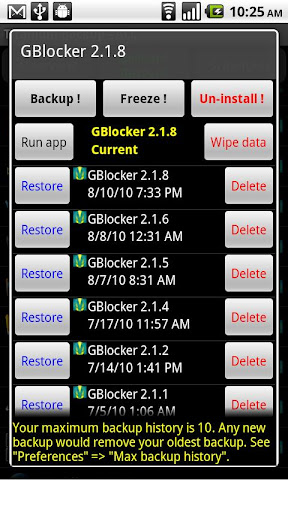
[✔] Multiple backups per app
[✔] 0-click batch restore
[✔] Backup/restore SMS,MMS,calls,bookmarks,Wi-Fi AP as XML
[✔] Multi-user support for some apps! (eg: games)
[✔] Batch verification
[✔] Backup apps without closing them!
[✔] Create your own update.zip containing apps+data!
[✔] Restore individual apps+data from non-root ADB backups!
[✔] Restore individual apps+data from CWM backups!
[✔] Restore individual apps+data from TWRP backups!
[✔] Hypershell speed
[✔] Migrate system data across different ROMs
[✔] Market Doctor (relink apps to Market)
[✔] "Destroy all Market links" feature
[✔] Apps freezer (incl. batch support)
[✔] Market "auto updating" manager
[✔] Convert user apps <=> system apps
[✔] Encryption
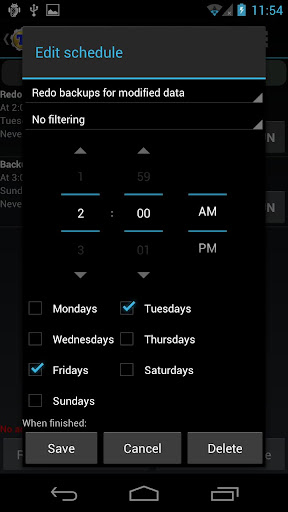
[✔] Unlimited schedules
[✔] Sync to/from Dropbox (manual/scheduled)
[✔] Sync to/from Box (manual/scheduled)
[✔] Sync to/from Google Drive (manual/scheduled)
[✔] TB Web Server: download/upload your backups as a single ZIP on your computer
[✔] Load/Save a Filter and use it in Widgets/Schedules
[✔] Change the device's Android ID, restore it from a backup or after a factory reset
[✔] Protect backup against deletion
[✔] Send backup (to e-mail/cloud) and import it in 1 click
[✔] Backup→Verify→Un-install an app in one shot
[✔] Freeze/defrost/launch apps in a single click
[✔] CSV export any app DB (e-mail or Google Docs)
[✔] Brand the app with your name
[✔] Bloatware Melter (experimental)
[✔] Convert app data to/from faster WAL DB format
[✔] And more!
More Memory:
[✔] Dalvik cache cleaner
[✔] Integrate system app updates into ROM
[✔] Move apps into ROM
[✔] Integrate Dalvik cache system elements into ROM
What the Press says:
"The Most Essential App For Android" - Tech'n'Life
"NONE can compare with this one" - Android Market Review
"The Best Backup App for Android" - Lifehacker
"The hands down best Backup on the market" - Absolutely Android
"It is a must-have backup app" - Droid Ninja
Support & Upgrades:
• All upgrades are FREE.
• If Market won't download your PRO key: although credit card authorization *usually* occurs instantly, in rare cases it may need up to a few hours to complete. Try the Web version of Play Store. If problem persists, login at checkout.google.com to cancel your order & try again.
• If your PRO key doesn't work (eg: installed before the purchase completed) please un-install it and then reinstall it from the Web version of Play Store.
• We aren't responsible for any currency conversion fees charged by credit card issuers.
• For support please see the Knowledge Base at http://titaniumtrack.com/kb and then e-mail us at the address below.

Download Via PlayStore

Or

Download Free


Password :
garasi-android.com


Muslim Pro Adzan, Al-Qur'an & Qiblat V2.3 apk (Pengingat Waktu Shalat)


Muslim Pro:
Azan paling akurat, Quran dan kiblat di dunia mobile
Diakui oleh jutaan pengikut Islam melalui dunia Muslim sebagai waktu Sholat yang paling akurat pada perangkat mobile.


FITUR UTAMA:
- Waktu shalat berdasarkan lokasi Anda saat ini
- Azan / Adzan: pemberitahuan visual dan audio / panggilan untuk Shalat
- Kitab Suci Quran (Al Qur'an) dengan bacaan (audio), transliterasi (fonetik) dan terjemahan dalam bahasa Inggris, Perancis, Jerman, Indonesia dan Turki
- Animasi Qiblat kompas untuk menunjukkan arah ke Mekah
- Kalender Muslim / Islam (Hijriah)  untuk memperkirakan tanggal suci Islam seperti Idul Fitri dan Idul Adha
- Waktu Puasa disorot selama bulan Ramadhan
- Widget dengan waktu Shalat dan tanggal Islam.


Download BusyBox Pro 9.6.7 apk

Root required for this application!
The fastest, most trusted, and #1 BusyBox installer and uninstaller!
Over 4 million installs and over 10,000 5 Star ratings!
Mentioned in the new XDA-Developers book "XDA Developers' Android Hacker's Toolkit: The Complete Guide to Rooting, ROMs and Theming"
Winner of best Utility Software award for Android via Handster.
This is the only installer that is ad free and requires no internet permission!
The only installer that will install ANY Busybox binary available for Android...you find it on the web and this will install it!
This installer has the smallest Busybox binaries available, right around 800kb unlike the other installers which are over a meg.
Pro version contains no ads or nag screens, Backup feature (for safer installs), uninstall feature, Advance Smart install feature, the ability to hand pick the applets you want, safety check for missing applets on start, and better overall support. The pro version will receive more frequent updates than the free version will.
The source for this application can be found here: https://code.google.com/p/busybox-android/
Featured on the BusyBox website at: http://busybox.net/products.html
The BusyBox source code can be found here: http://git.busybox.net/busybox/
A must have for any rooted phone! Almost EVERY rooted applications needs BusyBox to perform their magic, if you have a rooted phone then you need BusyBox.
Please note I did not write BusyBox! I wrote this installer and cross compiled BusyBox for Android. Please see the about menu option for more details or here: www.BusyBox.net
BusyBox is a software application that provides many standard Unix tools, much like the larger (but more capable) GNU Core Utilities. BusyBox is designed to be a small executable for use with the Linux kernel, which makes it ideal for use with embedded devices. It has been self-dubbed "The Swiss Army Knife of Embedded Linux".
Leave this installed if you always want to get the latest version of busybox!
tags: busybox, utility, terminal, emulator, root, stericson, adb, toolbox, rom, unlock, jailbreak, root, linux, unix, shell, script, tools, android, installer, busybox installer, bb, custom, installer, pro, android, android root


Download Root Explorer (File Manager) v2.18 Apk

Requirements: Android OS 1.0+
Overview: The ultimate file manager for root users. Access the whole of android's file system (including the elusive data folder!).

Features include SQLite database viewer, Text Editor, create and extract zip or tar/gzip files, multi-select, execute scripts, search, remount, permissions, bookmarks, send files (via email, bluetooth etc), image thumbnails, APK binary XML viewer, change file owner and group.

Recent changes:
v2.17.2 - Ice Cream Sandwich fix. Fixes the display problem reported on Galaxy Nexus and Nexus S (with ICS ROM).
v2.17.1 - A maintenance release containing several small bug fixes.
v2.17 - Added "Open With" function, symbolic link creation and enhanced properties with folder size, MD5 checksum, link target path and mime type.


Download Google Play 3.10.14 Patched + Google Play Patched Installer 1.0.8 apk


Google Play Store Mod 3.10.10 Patched by ChelpuS adalah aplikasi pengganti Google Play storea buat HH kamu, dengan aplikasi ini  kita tidak akan membutuhkan Lucky Patcher untuk remove verification ataupun untuk Custom Patch. 
Karena license verification akan otomatis licensed 
Lalu untuk versi Mod atau Patched ini akan mempunyai keunggulan atau keuntungan tersendiri jika kita menginstallnya di HH Android kita. Seperti yang sudah saya tuliskan di awal tadi bahwa dengan aplikasi ini kita tidak memerlukan lagi lucky patcher untuk me remove verification, custom patch dll seperti yang biasa kita lakukan dulu ketika kita menginstall PowerAmp, Mx Player, Titanium Backup Pro, TSF Shell dan juga aplikasi lain yang harus remove verification atau yang biasa kita patch dengan Lucky Patcher.


What's New in This Mod version:
  • Dengan Google Play Patched Mod by ChelpuS ini kita dapat menggunakan aplikasi yang dilindungi dengan License Verification Library secara full tanpa harus cracking
    • Memverifikasi License secara offline
    • Kita tidak perlu lagi mem-patch dengan Lucky Patcher
    • INGAT ! Dgn Play Store Mod ini BUKAN BERARTI kita bisa mendownload app berbayar secara gratis dar Market
    • Disable self update, Play store ini tidak akan update secara otomatis jika google rilis Play Store terbaru
    • (New) Icon baru
    • (New) Tombol refund reworked
    • (New) Modded Android 2.3.6 Added
Thanks to ChelpuS & SaNXeVC 


*Disini paket download terdapat 2 file yang kita bisa memilih salah satu metode yang akan kita gunakan, tapi saya yakin pasti kebanyakan dari kita akan memilih cara pertama karena cara ini sangat simple.*

# Untuk cara pertama kita tinggal install Google Play Installer kemudian jalankan lalu klik “Install and reboot”.


# Lalu untuk cara kedua install Google Play Store Mod by ChelpuS ini, kalau yang saya lakukan adalah dengan cara menginstall biasa atau layaknya kita menginstall app, ini saya lakukan dalam keadaan HH saya sebelumnya sudah memakai Google Play Store Mod 3.10.9 Patched, jadi tinggal saya timpa saja installannya dan kemudian saya integrasikan updatean tersebut ke ROM dengan menggunakan Titanium Backup. yang caranya buka Titanium Backup --> Pilih Google Play Store --> Tekan dan tahan --> Lalu pilih "integrate update into ROM" , tunggu hingga selesai. ini saya lakukan semata-mata untuk menghemat memory saja, karena jika tidak di integrasikan, satu aplikasi + update an nya memakan 2 tempat, app aslinya ada di ROM sedangkan updatean nya ada di memory telepon. 

Kemudian jika HH sebelumnya belum pernah memakai Google Play Store Mod Patched, untuk langkah penginstallan nya adalah sebagai berikut:
  1. Install Lucky Patcher (jika sudah ada silakan dilewati)
  2. Kemudian buka Lucky patcher dan klik tombol menu HH
  3. Pilih "Patch to Android"
  4. Kemudian pada pop up, centang/check kotak "Signature Verify always True" dan "Disable Zip Signature Verify"
  5. Lalu klik apply dan HH akan reboot dengan sendirinya
  6. Setelah HH kembali hidup, silakan di cek kembali apakah patch nya sudah ter apply, caranya seperti tadi, buka Lucky Patcher -> Menu -> Patch to Android, jika patching nya sukses maka dibawah "Signature Verify always True" dan "Disable Zip Signature Verify" akan ada keterangan 2/2 patched applied dan patch applied
  7. Setelah patching sukses, sekarang tinggal push Google Market nya ke /system/app dengan root explorer, caranya rename Google Play Mod Patched yang sudah di download tadi menjadi "Vending.apk" (tanpa tanda kutip) untuk HH dengan OS Gingerbread dan "PhoneSky.apk" (tanpa tabda kutip) untuk OS ICS/JB
  8. Setelah direname, lalu kita taruh atau paste ke /system/app, jika ada pertanyaan "overwrite" di yes saja, dan setelahnya kita set permissionnya menjadi rw-r--r-- atau 644
  9. Reboot HH
  10. Selesai


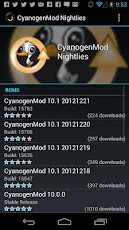
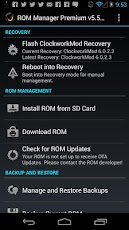
Download ROM Manager (Premium)

ROOT USERS ONLY!
IF YOU ARE HAVING LICENSE ISSUES, MAKE SURE YOU HAVE THE LATEST VERSION OF FREE (4.0+) AND THE LATEST LICENSE (1.0.8+) INSTALLED!
Turn off ads in settings!
Prefer doing installations manually in recovery? Check out the new touch recoveries, available as a separate and cheaper in app purchase in the free version of ROM Manager!
Did flashing break your recovery? Flash an alternate/experimental one and flash back to fix!
Manage your ROMs via a handy UI. organize and perform backups and restores from within Android! Install your favorite ROMs over the air!
IF YOU ARE HAVING LICENSE ISSUES, MAKE SURE YOU HAVE THE LATEST VERSION OF FREE (4.0+) AND THE LATEST LICENSE (1.0.8+) INSTALLED!


Titanium Backup Pro 6.0.2.1 APK

Titanium Backup is the most powerful backup tool on Android, and then some.
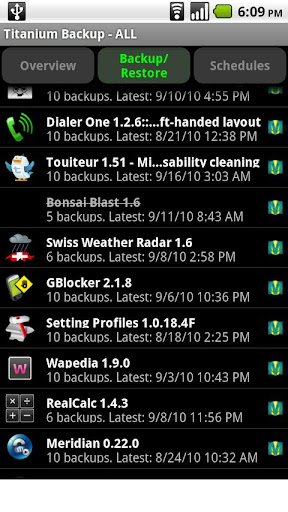
You can backup, restore, freeze (with Pro) your apps + data + Market links. This includes all protected apps & system apps, plus external data on your SD card. You can do 0-click batch & scheduled backups.


Backups will operate without closing any apps (with Pro). You can move any app (or app data) to/from the SD card. You can browse any app's data and even query the Market to see detailed information about the app.

PRO FEATURES ADDED:
  • Multiple backups per app
  • 0-click batch restore
  • Multi-user support for some apps! (eg: games)
  • Batch verification
  • Backup apps without closing them!
  • Restore individual apps+data from CWM backups!
  • Restore individual apps+data from TWRP backups!
  • Hypershell speed
  • Migrate system data across different ROMs
  • Market Doctor (relink apps to Market)
  • "Destroy all Market links" feature
  • Apps freezer (incl. batch support)
  • Market "auto updating" manager
  • Convert user apps <=> system apps
  • Encryption
  • Unlimited schedules
  • Sync to/from Dropbox (manual/scheduled)
  • Sync to/from Box (manual/scheduled)
  • Sync to/from Google Drive (manual/scheduled)
  • Load/Save a Filter and use it in Widgets/Schedules
  • Protect backup against deletion
  • Send backup by e-mail
  • Backup→Verify→Un-install an app in one shot
  • Freeze/defrost/launch apps in a single click
  • CSV export any app DB (e-mail or Google Docs)
  • Brand the app with your name
  • Bloatware Melter (experimental)
  • Convert app data to/from faster WAL DB format
MORE MEMORY:
  • Dalvik cache cleaner
  • Integrate system app updates into ROM
  • Move apps into ROM
  • Integrate Dalvik cache system elements into ROM
What's in this version : (Updated : Feb 10, 2013)
  • Added the ability to create custom labels directly from the "Assign labels" dialog.
  • Fixed failure with XML bookmark backup/restore with Chrome as stock browser (eg: Nexus 7).
  • Several UI tweaks.
  • Updated translations.